
Quick Summary: The Video Transmitter (VTX) is the heart of your FPV system, wirelessly transmitting camera footage to your goggles. This guide covers everything from analog vs digital systems to power requirements and antenna compatibility, helping you choose the perfect VTX for your needs.
Introduction: What is a Video Transmitter (VTX)?
The Video Transmitter, commonly known as VTX, is a crucial component in FPV (First Person View) drone systems. It’s responsible for wirelessly transmitting the live video feed from your drone’s camera directly to your FPV goggles or ground station. Choosing the right VTX can significantly impact your flying experience, affecting video quality, range, latency, and overall reliability.
When selecting a 5.8GHz VTX, you need to consider multiple factors beyond just output power: compact size, feature set, channel support, accurate frequency transmission, and compatibility with your existing gear. This comprehensive guide will walk you through every aspect of VTX selection, helping you make an informed decision.
Analog vs Digital FPV Systems: Which One is Right for You?
Analog FPV Systems
Analog technology is what started the FPV hobby and remains popular today due to its low latency and affordability.
- Image Quality: Comparable to old-school television with noticeable static or “snow” when signal weakens
- Latency: Extremely low (typically 10-30ms), perfect for racing and fast-paced flying
- Cost: Generally more affordable than digital systems
- Compatibility: Wide range of compatible equipment from various manufacturers
Digital FPV Systems
Digital systems, pioneered by DJI in 2018, offer superior image quality at the cost of slightly higher latency.
- Image Quality: Crystal clear HD video (720p to 1080p+)
- Latency: Slightly higher than analog (typically 20-40ms) but acceptable for most applications
- Cost: More expensive initial investment
- Systems Available: DJI, Walksnail (Avatar), and HDZero – all incompatible with each other
Important: Analog and digital FPV systems are completely incompatible. You cannot use analog goggles with digital VTXs, or vice versa. Even different digital systems (DJI, Walksnail, HDZero) are incompatible with each other.
VTX Recommendations by System Type
| System | Best For | Top Recommendations | Key Features |
|---|---|---|---|
| DJI Digital | Best image quality, cinematic flying | • DJI O3 Air Unit • DJI Vista | 4K recording, excellent range, integrated system |
| Walksnail (Avatar) | Lightweight digital, good balance | • Avatar HD Nano • Avatar HD Pro | Lightweight, good image quality, affordable digital option |
| HDZero | Racing, low latency digital | • HDZero Freestyle VTX • HDZero Race VTX | Lowest digital latency, excellent for racing |
| Analog | Budget, racing, lightweight builds | • TBS Unify Pro32 Nano • TBS Unify Pro32 HV • Rush Tank Solo 2 | Low cost, lightweight, wide compatibility |
Technical Specifications: What Really Matters
1. Output Power (mW)
Output power directly affects your video range:
- 25mW: Indoor flying, very short range
- 200mW: Park flying, medium range
- 500-800mW: Long range flying
- 1W+: Extreme long range (check local regulations)
Pro Tip: Higher power isn’t always better. It generates more heat, consumes more battery, and can interfere with other pilots. Start with 200-500mW for most applications.
2. Antenna Connectors
Choosing the right antenna connector is crucial for signal quality:
- SMA/RP-SMA: Most common, durable, best for larger drones
- UFL/IPEX: Tiny connectors for micro drones, less durable
- MMCX: Good balance between size and durability
3. Power Requirements
- Analog VTX: Typically 5V or 7-36V input
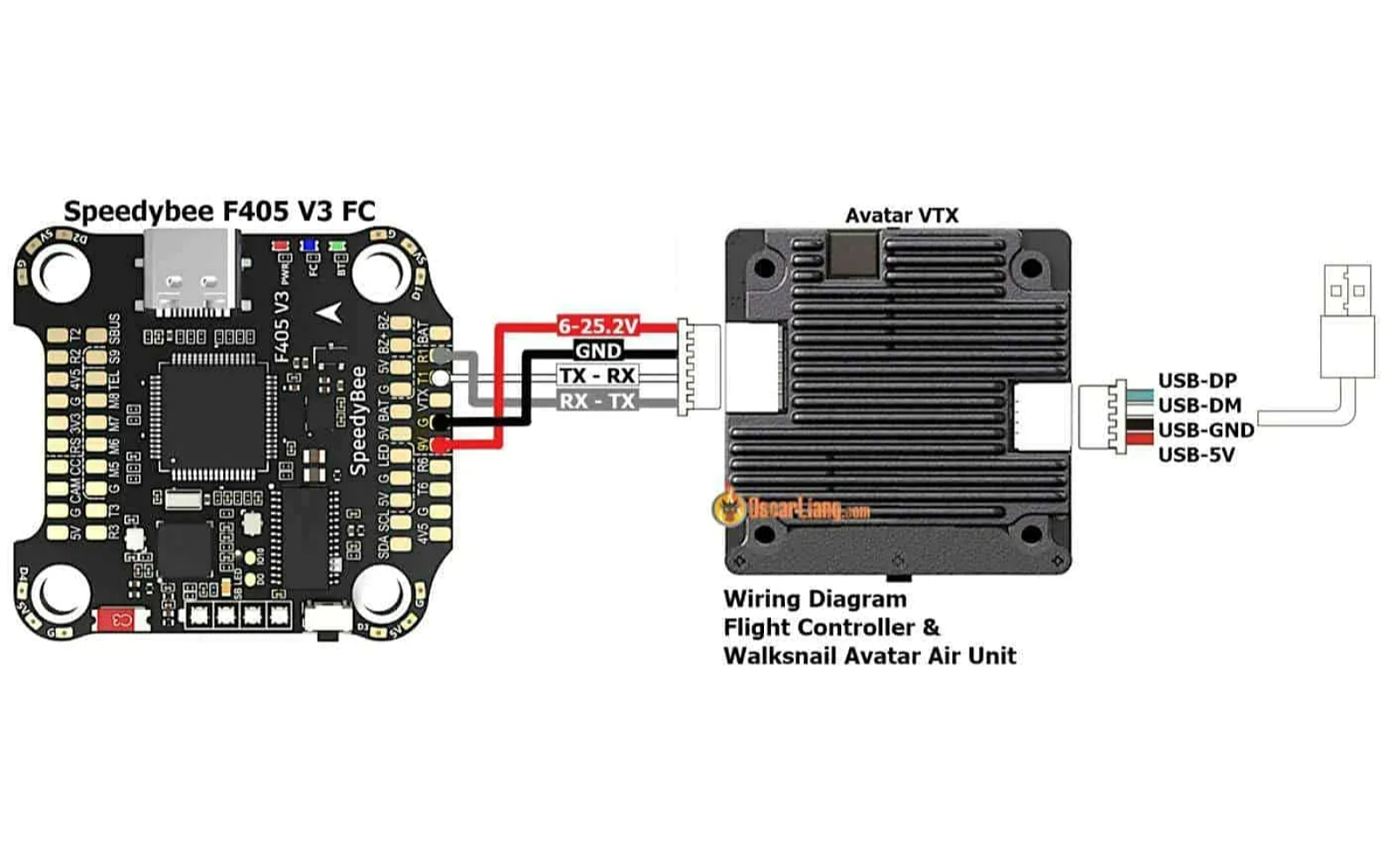
- Digital VTX: Higher voltage and current requirements (check manufacturer specs)
- Always use a capacitor on power leads to reduce noise
4. Channel Support
Modern VTXs should support:
- All standard 5.8GHz bands (A, B, E, F, R, L)
- RaceBand (R) for organized racing events
- Frequency tuning in 1MHz steps for precise channel selection
Key Features to Look For
SmartAudio/Tramp Protocol Support
Allows you to change VTX settings (power, channel) directly from your radio transmitter or OSD (On-Screen Display). This is essential for convenient field adjustments.
Pit Mode
A low-power mode (usually 0-25mW) that lets you configure your drone on the bench without transmitting at full power and interfering with other pilots.
Onboard Microphone
Some VTXs include a microphone to transmit audio to your goggles. Great for hearing motor sounds and environmental audio.
Temperature Protection
High-quality VTXs include thermal protection that automatically reduces power if temperatures get too high, preventing damage.
Installation Best Practices
CRITICAL: Never power up a VTX without an antenna connected! This can permanently damage the VTX in seconds.
Proper Installation Steps:
- Always connect antenna before powering on
- Use an LC filter if experiencing video noise
- Keep VTX away from other electronics to reduce interference
- Ensure proper grounding of all components
- Use heat shrink or electrical tape to prevent shorts
Avoiding Video Noise:
- Use separate power sources for VTX and other electronics when possible
- Add capacitors to power leads
- Keep video wires away from power wires
- Use twisted pair wires for video signal
Frequently Asked Questions (FAQ)
Q: Can I use a digital VTX with analog goggles?
A: No. Digital and analog systems are completely incompatible. You need matching systems (digital VTX with digital goggles, or analog VTX with analog goggles).
Q: What’s more important: VTX power or antenna quality?
A: Antenna quality is equally, if not more, important than VTX power. A good antenna with a 200mW VTX often outperforms a poor antenna with a 1W VTX.
Q: How do I avoid interfering with other pilots?
A: Use pit mode when on the ground, scan for clear channels before flying, and avoid using maximum power unnecessarily.
Q: Can I upgrade from analog to digital later?
A: Yes, but it requires replacing both the VTX and goggles (and sometimes camera). Plan your investment accordingly.
Conclusion: Making the Right Choice
Choosing the perfect VTX depends on your specific needs:
- For beginners on a budget: Start with a good quality analog VTX like the TBS Unify Pro32 or Rush Tank Solo
- For cinematic flying and best image quality: DJI O3 Air Unit is currently the best option
- For racing with digital: HDZero offers the lowest latency
- For lightweight digital builds: Walksnail Avatar HD Nano is an excellent choice
Remember that your VTX is just one part of the FPV system. A good antenna, proper installation, and correct settings are equally important for optimal performance. Always check local regulations regarding transmission power, and be considerate of other pilots by using pit mode and selecting clear channels.
Final Recommendation: If you’re just starting out, consider getting a mid-range analog VTX (200-500mW) to learn the basics. Once you’re comfortable and know your flying style, you can invest in a digital system if desired. The learning experience with analog will serve you well regardless of which system you ultimately choose.