
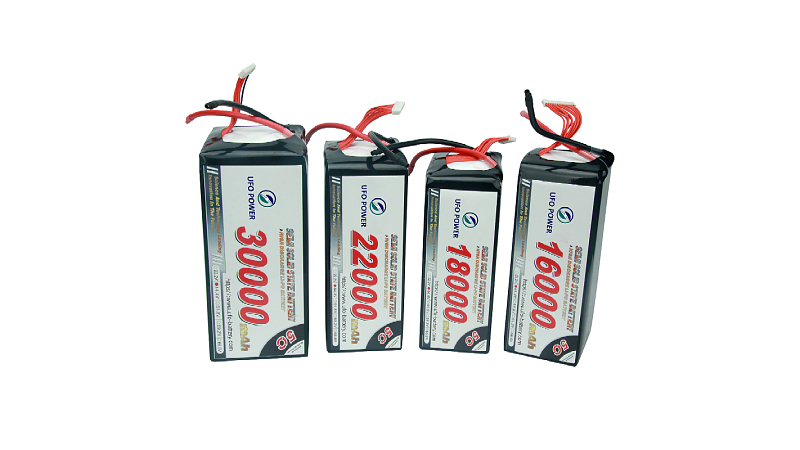
Drone batteries—most commonly Lithium Polymer (LiPo) or Lithium-Ion packs—are the heart of unmanned aerial systems (UAS). When they falter, flights end prematurely, equipment can be damaged, and safety risks escalate. Properly troubleshooting your drone’s battery is key to ensuring flight safety, performance, and longevity.
This comprehensive guide, drawing on industry expertise and best practices from UFOUAV, tackles the most frequent drone battery problems, their causes, and actionable solutions. Whether you’re a hobbyist or professional operator, these insights will help keep your flights safe, efficient, and successful.
1. Drone Battery Voltage Sag
Voltage sag is the drop in voltage under load, often noticeable when accelerating, climbing, or carrying heavy payloads. A mild sag is normal, but excessive sag can cause early low-voltage warnings or in-flight shutdowns—critical risks for any drone operation.
Causes of Drone Battery Voltage Sag
- High Power Demand: The motors are demanding more power than the battery can supply smoothly, often due to aggressive flying or heavy payloads.
- Cold Weather: Low temperatures increase the battery’s internal resistance (IR), making it harder for power to flow, which causes a significant voltage drop.
- Aging Battery: As a battery ages, its internal resistance naturally increases, leading to more pronounced voltage sag.
- Over-Discharged History: Past deep discharges damage cells, reducing their ability to supply consistent power.
Troubleshooting Drone Battery Voltage Sag
- Warm Up Your Batteries: Before flying in the cold, keep your batteries in a warm place until they reach at least 20°C (68°F) to reduce internal resistance.
- Reduce Load: Avoid aggressive maneuvers, especially when the battery is below 50% charge or in cold conditions. Fly conservatively when facing headwinds.
- Check Internal Resistance (IR): Use a smart charger with IR monitoring. A healthy LiPo cell typically has an IR below 10mΩ; significantly higher values indicate an aging battery that needs replacement.
- Check Battery Health: Use manufacturer apps to view battery cycle count and health status. High cycle counts usually mean a higher risk of voltage sag.
- Replace Aging Batteries: Batteries exhibiting severe sag—even when warm—are likely worn out. Replace them to avoid in-flight failures.
2. Drone Battery Capacity Fade
Over time, drone batteries lose their total charge capacity—a phenomenon called capacity fade—directly reducing flight time. For example, a new 5000mAh battery might eventually only hold 4000mAh, leading to noticeably shorter flights even when charged to 100%.
Causes of Drone Battery Capacity Fade
- Natural Aging: All LiPo/Li-ion batteries degrade over time and cycles due to chemical reactions within the cells.
- High Cycle Count: Frequent charging and discharging accelerates wear and reduces maximum capacity.
- Storage Stress: Storing batteries fully charged (100%) or fully depleted (0%) for extended periods causes significant degradation.
- Heat Exposure: High temperatures during use, charging, or storage are a major contributor to capacity loss.
- Deep Discharges: Regularly draining batteries below the recommended minimum voltage (often 3.0V-3.3V per cell) causes permanent damage.
Troubleshooting Drone Battery Capacity Fade
- Proper Storage Voltage: For storage longer than a few days, charge or discharge batteries to their storage voltage (typically 3.8V to 3.85V per cell). Most smart chargers have a dedicated “storage” function.
- Avoid Deep Discharges: Never fly until the battery is completely dead. A safe rule of thumb is to land when the battery reaches about 3.3V per cell under load.
- Avoid Extreme Temperatures: Never leave batteries in hot cars or direct sunlight. Charge and store in a cool, dry place (15-25°C).
- Replace When Needed: Capacity fade is irreversible. Replace batteries when flight times become unacceptably short or health indicators show significant degradation.
3. Drone Battery Short Circuit
A short circuit occurs when a low-resistance path is accidentally created between the battery’s positive and negative terminals. This causes instant, dangerous current spikes, which can lead to sparks, fire, or explosion—posing severe safety risks.
Causes of Drone Battery Short Circuit
- Damaged Connectors or Wires: Frayed insulation or a damaged connector (e.g., XT60) can allow positive and negative leads to touch.
- Internal Failure: A manufacturing defect or physical damage (e.g., from a crash) can cause an internal short inside the battery.
- Conductive Debris: Loose metal or carbon fiber dust making contact with exposed battery terminals.
- Physical Damage: Punctures, crushing, or severe impact to the battery pack.
Troubleshooting & Prevention for Drone Battery Short Circuit
- Immediate Action: If you witness a short circuit, DO NOT touch the battery. Place it in a fireproof LiPo bag, discharge it completely in a safe area, and dispose of it according to hazardous waste guidelines.
- Inspect Regularly: Always check battery connectors and wires for signs of wear, tear, or damage before each use.
- Use Connector Caps: Cover battery terminals with protective caps when not in use to prevent contact with conductive materials.
- Safe Disposal: Never attempt to use a battery that has been short-circuited. Dispose of it at a designated battery recycling facility.
4. Drone Battery Deep Discharge Recovery (Use with Extreme Caution!)
A battery may refuse to charge or be recognized as “dead” by the charger/drone after being left discharged for too long (voltage per cell < 3.0V). This is a critical issue that requires extreme care.
Cause of Deep Discharge
Discharging below the minimum safe voltage causes permanent damage to the cell chemistry. The battery’s protection circuit may also permanently disable it to prevent further risk.
Troubleshooting & Solutions for Deep Discharge
- Prevention is Best: Avoid deep discharge at all costs. Set auto-discharge timers correctly and check voltages before storage.
- Recovery (Risky, Last Resort):
- WARNING: Attempting to recover a deeply discharged battery is risky and can cause fire. Never attempt recovery if the battery is swollen, punctured, or has dropped below 2.5V per cell.
- Use a Specialized Charger: Some advanced chargers have a very low-current “LiPo Recovery” or “Wake Up” mode.
- Strong Recommendation: Deeply discharged batteries are unstable and dangerous. Recovery attempts often fail and can cause fire. The safest course is proper disposal and replacement.
5. Drone Battery Not Charging
A common issue: the battery doesn’t charge when connected to the charger, with no lights or flashing error lights indicating a problem.
Causes of Drone Battery Not Charging
- Faulty Charger or Power Supply: The problem may lie with your charging equipment, not the battery itself.
- Damaged Cells or Balance Lead: The charger uses the balance lead to monitor individual cell voltages. A dead cell (0V) or broken balance wire will trigger an error.
- Voltage Too Low: Most smart chargers refuse to charge deeply discharged batteries as a safety precaution.
- BMS Lockout: “Smart” batteries with a Battery Management System (BMS) may lock themselves if they detect a fault (e.g., over-discharge, short circuit).
Troubleshooting Drone Battery Not Charging
- Check the Voltage: Use a multimeter or battery checker to verify total voltage and individual cell voltages via the balance port. A cell at 0V means the battery is likely dead.
- Try a Different Charger/Cable: Rule out a faulty charger by testing with an alternative if available.
- Inspect the Balance Connector: Look for bent or broken pins on the battery’s balance lead and the charger’s port.
- For Smart Batteries: Some manufacturer-specific procedures can reset a locked-out BMS, but often the battery requires professional service or replacement.
6. Drone Battery Overcharge
Overcharging a LiPo battery by pushing its voltage beyond the maximum safe limit (4.2V per cell) is extremely dangerous. It causes the electrolyte to break down, leading to cell swelling (puffing), thermal runaway, and fire. Modern BMS units mitigate this, but malfunctions can occur.
Causes of Drone Battery Overcharge
- Incorrect Charger Settings: Setting a LiPo charger to the wrong battery type (e.g., LiHV, Li-Ion) or cell count.
- Faulty Charger: A malfunctioning charger that doesn’t stop charging at 4.2V per cell.
- BMS Failure: A failure in the smart battery’s internal protection circuit.
Troubleshooting & Prevention for Drone Battery Overcharge
- Double-Check Settings: Always confirm your charger is set to “LiPo” and the correct charge rate. Use chargers with balance mode to prevent cell over-voltage.
- Never Leave Charging Unattended: Charge batteries in a fire-resistant LiPo bag or on a non-flammable surface where you can monitor them.
- If Overcharging Occurs: UNPLUG THE CHARGER IMMEDIATELY. Carefully move the battery (using gloves/tongs) to a safe, fireproof, outdoor location away from people and flammables. Monitor from a distance. DO NOT attempt to use or charge the battery again—dispose of it properly.
7. Drone Battery Overheating
A battery that becomes excessively hot during charging, discharging (flight), or storage is a serious concern. Excessive heat accelerates aging and can lead to thermal runaway.
Causes of Drone Battery Overheating
- High Current Draw: Aggressive flying, heavy payloads, or fighting strong winds increase power demand and heat.
- High Ambient Temperature: Flying or charging in hot weather amplifies battery heat.
- Faulty Cells or BMS: Internal short circuits or regulation failure can cause overheating.
- Fast Charging: Fast charging generates more heat than slower charging rates.
- Poor Ventilation: Charging in an enclosed space or covering the battery traps heat.
Troubleshooting & Solutions for Drone Battery Overheating
- Land Immediately: If overheating occurs during flight, land safely as soon as possible and power down the drone.
- Cool Down: Allow the battery to cool completely before handling, charging, or storing.
- Reduce Load: Fly more conservatively, especially in hot weather, to lower current draw.
- Avoid Peak Heat: Schedule flights for cooler parts of the day (e.g., early morning, late evening).
- Charge in a Cool, Ventilated Area: Ensure airflow around the battery while charging. Avoid fast charging in hot environments.
- Inspect: Check for swelling or damage. Monitor battery health status regularly.
8. Battery Not Recognized by Drone Firmware
The drone powers on but reports “Battery Error,” “Invalid Battery,” or fails to detect the battery entirely—preventing takeoff.
Causes of Battery Not Being Recognized
- Firmware Mismatch: Battery firmware is incompatible with the drone’s firmware.
- Corrupted Firmware: A glitch in the battery’s BMS firmware.
- Physical Connection Issue: Dirty, damaged, or bent data/power pins on the battery or drone.
- OEM Battery Restrictions: Use of unauthorized third-party batteries blocked by the drone’s firmware.
Troubleshooting & Solutions
- Clean Contacts: Power off the drone and battery. Carefully clean battery and drone contacts with isopropyl alcohol and a cotton swab. Inspect for bent pins.
- Update Firmware: Check for drone AND battery firmware updates via the manufacturer’s app. Install updates for both to ensure compatibility.
- Try Another Battery: Test with a known-good battery to confirm if the issue is battery-specific or drone-specific.
- Reset: Sometimes a full drone power cycle (power off, wait 30 seconds, power on) helps. Consult the drone’s manual for specific reset procedures.
- Use OEM Batteries: For models with firmware locks, use only manufacturer-approved batteries (e.g., UFOUAV’s genuine drone batteries) to avoid recognition issues.
9. Battery Communication Error with Drone
Many modern drones use “smart” batteries that communicate with the aircraft’s firmware via a data connection. When this link fails, an error message will often appear on your controller.
Causes of Battery Communication Error
- Dirty or Damaged Contacts: Data pins on the battery or drone may be dirty, oxidized, or damaged.
- Firmware Mismatch: The battery’s internal firmware and the drone’s firmware may be incompatible after an update.
- BMS Fault: The battery’s internal management system may have a fault and be unable to communicate.
Troubleshooting Battery Communication Error
- Clean the Contacts: Power down all equipment. Gently clean the gold or silver contact pads on both the battery and drone with a soft, dry cloth or pencil eraser. For stubborn grime, use a small amount of isopropyl alcohol on a cotton swab and let it dry completely.
- Update Firmware: Ensure both your drone and all batteries are updated to the latest firmware. Some updates must be applied to each battery individually.
- Power Cycle: Restart the drone and re-insert the battery to reset the communication link.
10. Drone Battery Under-Voltage Lockout (UVLO)
Under-Voltage Lockout (UVLO) is a safety feature built into the drone’s flight controller or the battery’s BMS. It prevents the drone from drawing power from a battery whose voltage has fallen dangerously low, protecting the battery from deep discharge damage. The BMS triggers UVLO when cell voltage(s) drop below the critical minimum threshold (e.g., < 2.5V-3.0V per cell).
Causes of UVLO
- Ignoring Low Battery Warnings: Flying too long and depleting the battery beyond safe levels.
- Extended Discharge: Leaving the battery discharged for a long period (self-discharge) can drop voltage below the UVLO threshold.
- Unbalanced/Faulty Cells: A severely unbalanced or faulty cell can drag the entire battery pack’s voltage down.
- High Current Spikes: Voltage sag from aggressive flying or heavy loads can trigger UVLO.
- Miscalibrated BMS: A poorly calibrated BMS may trigger UVLO prematurely or incorrectly.
Troubleshooting UVLO
- Charge the Battery: The most common cause of UVLO is a depleted battery. Charge it to full before attempting to fly again.
- Check for Voltage Sag: If a fully charged battery triggers UVLO upon takeoff, it’s a sign of extreme voltage sag (caused by cold or aging). Refer to the Voltage Sag section above.
- Calibrate the Battery: Some smart battery systems require periodic calibration (fully charge, discharge to a low level, then fully charge again) to ensure accurate voltage reporting. Follow the manufacturer’s instructions.
11. Drone Battery Maintenance Best Practices (Prevent Issues Before They Occur)
Proper maintenance is the best way to prevent most drone battery issues and maximize battery lifespan. Follow these guidelines from UFOUAV to keep your batteries in top condition:
- Storage: Keep batteries at 3.8V per cell (50-60% charge) in a cool, dry place (15-25°C). Avoid storing fully charged batteries for long periods.
- Charging: Use official or high-quality chargers at a 1C rate. Charge to full only before flights, and remove the battery immediately after charging.
- Discharge: Land when the battery reaches 20-30% charge. Perform a full charge-discharge cycle every 3 months to maintain cell balance.
- Inspection: Check for swelling, leaks, or damage before each use. Discard any battery that shows signs of damage.
- Temperature Management: Avoid extreme temperatures (hot or cold). Preheat batteries in cold weather before flying.
- Tracking: Log battery cycles and health via manufacturer apps to monitor wear.
- Label Batteries: Number your batteries and rotate their use to ensure even wear across your collection.
Conclusion
While many drone battery issues can be diagnosed and temporarily resolved, safety should always be your top priority. By understanding these common problems and applying systematic troubleshooting and preventative maintenance, you can significantly improve battery reliability, safety, and drone performance.
If a battery shows signs of severe damage, swelling, or repeated errors, replacement is the most reliable and safe option. As a trusted provider of drone solutions, UFOUAV offers high-quality, reliable drone batteries designed to minimize failure risks during flight. Our advanced battery management systems ensure safety, efficiency, and long lifespan—so you can focus on flying with confidence.
If you have any questions, need troubleshooting support, or are looking for replacement drone batteries, please feel free to contact us at info@ufouav.com.